
Firmware Upgrade for the Hive Scale
Enjoy regular updates for the hive scale and always stay up to date with the latest advances in beekeeping
Modern technology is wonderful, but the problem is that it is constantly changing. You can buy the newest device on the market and in a few months something newer and better will appear. The same was true in the world of hive scales.
Or rather — it used to be. The BeeScale.io hive scale brings a significant improvement in this area: it offers continuous firmware updates and delivers new and improved features.
The central unit of BeeScale.io is the heart of the scale. It is a small computer that can connect to the Internet via its built-in SIM card. And like any other computer, it can receive updates with the latest firmware version.
By updating the firmware you can continually add new functions and features to your scale and keep it current with the latest innovations and developments. This means your hive scale can remain comparable to the newest products on the market. Updating the firmware is quick and simple: you only need to connect your scale to your computer and upload the new firmware. We have prepared a step-by-step guide to help you get started.
Get your BeeScale.io today and enjoy years of new and improved features.
Our award-winning BeeScales.io is an innovative hive scale with automatic hourly weight measurement and firmware updates. It enables remote monitoring of your hives via a mobile app and web portal and is solar-powered to ensure continuous autonomy. It helps you provide a low-stress environment for your bees, sends immediate alerts if there is a problem in the hive, and always gives you an overview of hive conditions.
Learn more about BeeScale.io and all its benefits, and find out how it works
Improve your beekeeping!
Firmware update guide
You can update the scale software with a special program that can be downloaded from this link: https://download.beescales.io/diagnostictool/setup.msi
Download drivers for USB serial communication
If the computer does not detect the central unit, it means there are no drivers for USB serial communication via the FTDI chip installed on the computer. In that case, please install the drivers from this page: https://ftdichip.com/drivers/vcp-drivers/
Below you will find instructions on how to use the program.
How to download the file
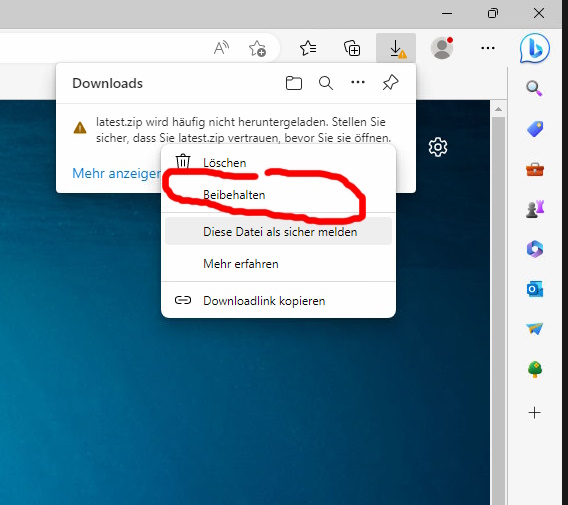
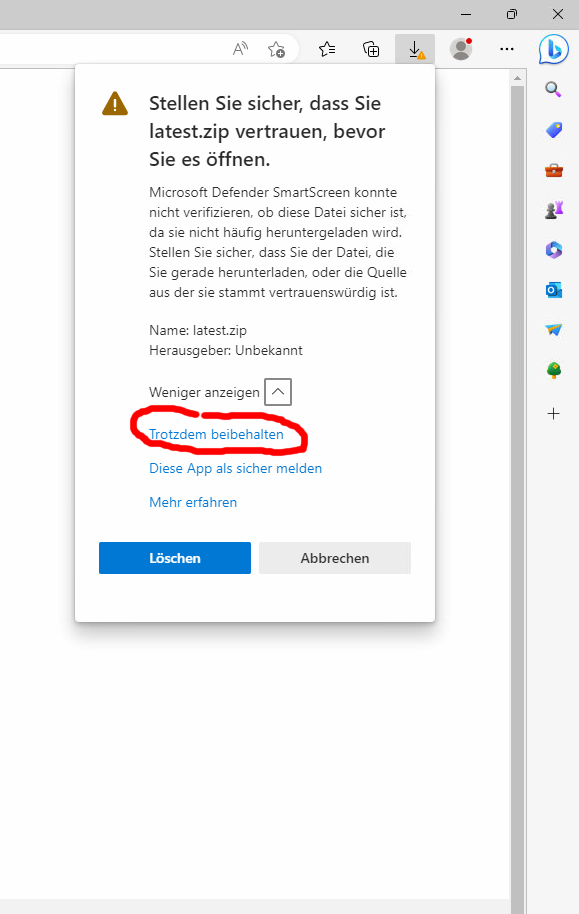
Browsers can sometimes block the download of the installation file.
The program is safe to use but is not officially certified by Microsoft, which is why these warnings may appear.
To download the file you must first allow the download. This option can be rather hidden.
Examples of warnings and how to allow an exception are shown in the images.
1. Video instructions
Installation of the diagnostic and firmware update program for the hive scale software
How to send the hive scale diagnostic log to support
How to update the hive scale firmware
2. Written instructions for working with the hive scale diagnostic program


