
Hive Scale Firmware Upgrade
Enjoy regular updates for your hive scale and always stay informed about the latest advances in beekeeping
Modern technology is wonderful, but the problem is that it constantly changes. You can buy the newest device on the market and in a few months something newer and better will appear. The same applies in the world of hive scales.
Or rather — it used to. The BeeScale.io hive scale brings a significant improvement in this area: it provides continuous firmware updates and delivers new and improved functions over time.
The BeeScale.io central unit is the heart of the scale. It is a compact computer that can connect to the internet via a built-in SIM card. Like any other computer, it can receive updates with the latest firmware version.
By updating the firmware you can continuously add new features and capabilities to your scale, keeping it aligned with the latest innovations and developments. This means your hive scale remains comparable with the newest products on the market. Updating the firmware is quick and easy: simply connect your scale to your computer and upload the new firmware. We have prepared a step-by-step guide to help you get started.
Our award-winning BeeScale.io is an innovative hive scale with automatic hourly weight measurements and UPDATES. It enables remote monitoring of your hives via mobile app and web portal, is solar-powered for continuous autonomy, helps you provide a low-stress environment for your bees, sends immediate alerts if there is an issue in the hive, and always gives you an overview of conditions around your hive.
Improve your beekeeping!
Firmware Update Guide
You can update the scale software with a special program available for download at this link: https://download.beescales.io/diagnostictool/setup.msi.
Download drivers for USB-serial communication
If your computer does not recognize the central unit, it means the computer lacks drivers for USB-serial communication via the FTDI chip. In that case, please install the drivers from this page: https://ftdichip.com/drivers/vcp-drivers/
Below you will find instructions on how to use the program.
How to download the file
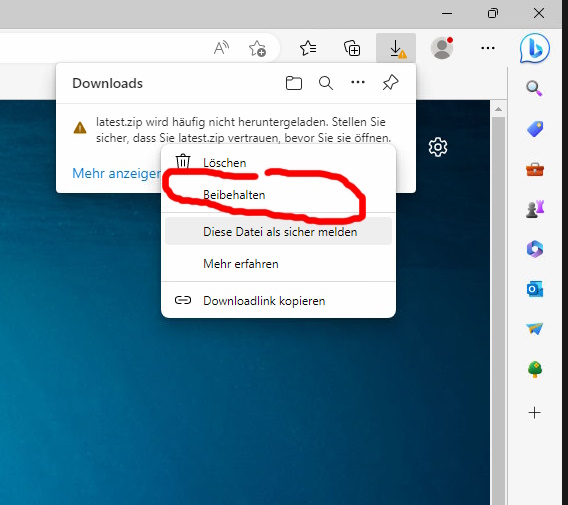
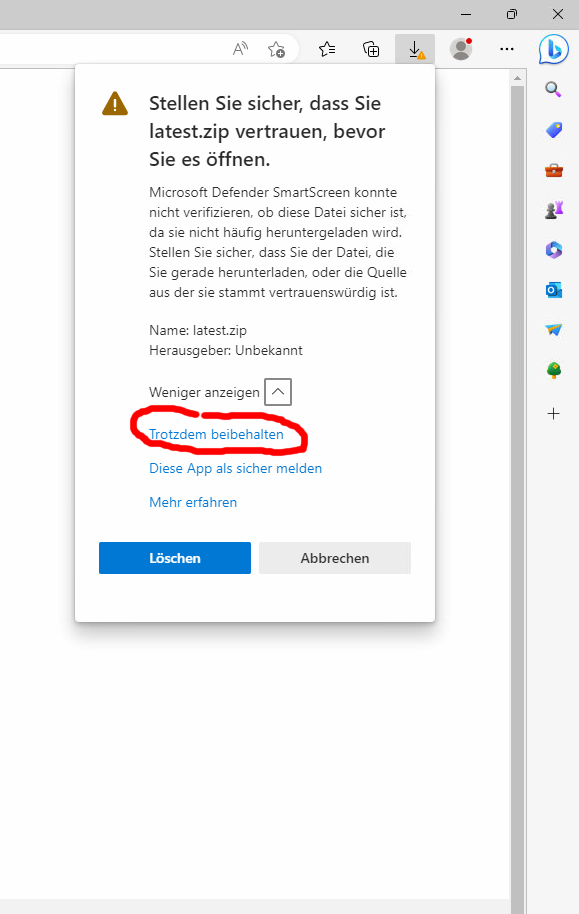
Browsers may sometimes block the download of the installation file.
The program is safe to use, but it is not officially certified by Microsoft, which is why these warnings may appear.
To download the file you must first allow the download. This option can be somewhat hidden.
Examples of warnings and how to allow an exception are shown in the images.
1. Video instructions
Installing the diagnostic and firmware update program for the hive scale
How to send the hive scale diagnostic log to support
How to update the hive scale firmware
2. Written instructions for using the hive scale diagnostic program


